


No installation required
Add parent camera access to your daycare, without calling an installer
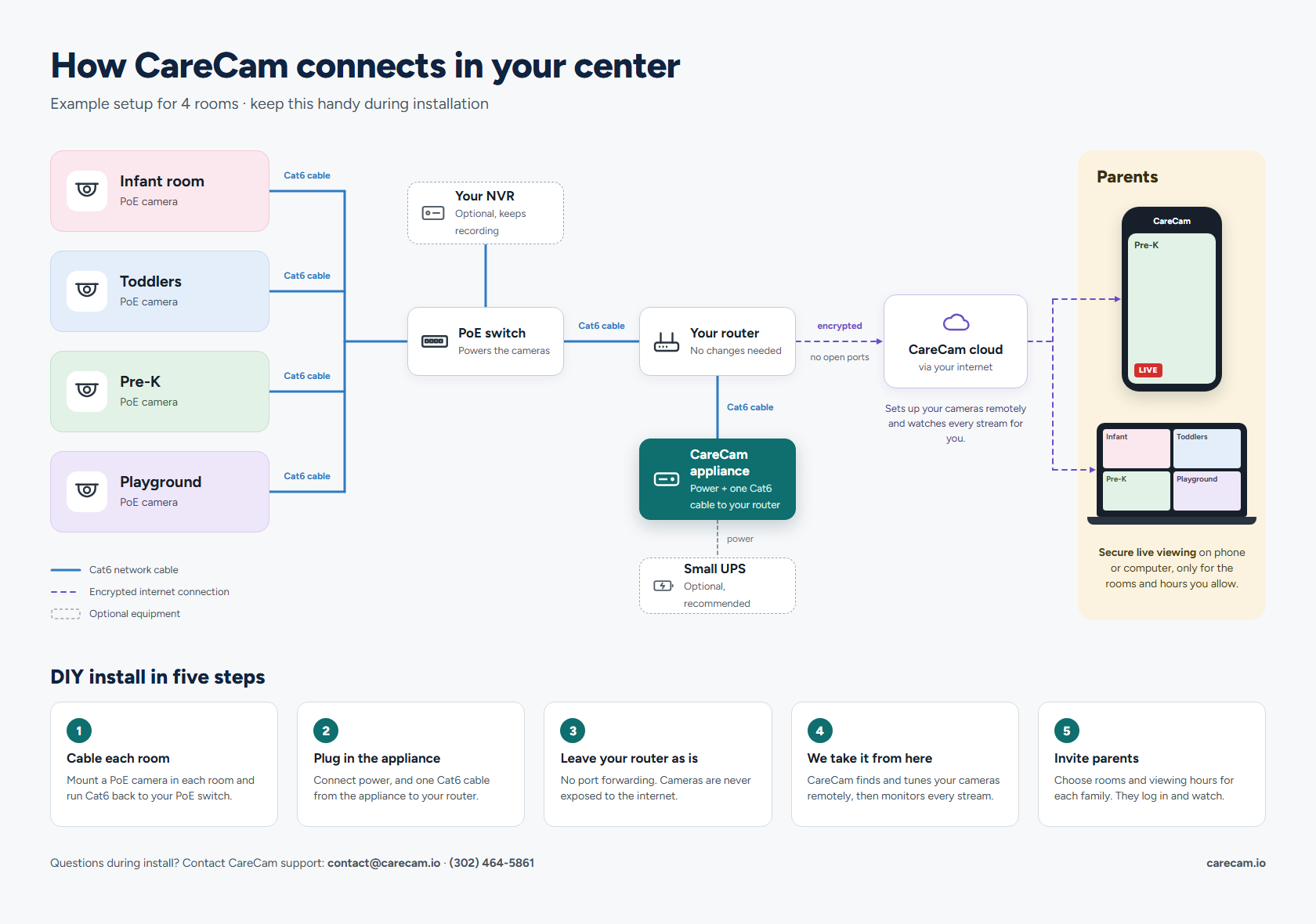
Most childcare camera platforms require a professional installation costing $500–$3,000 and a weeks-long scheduling wait. CareCam doesn't. If you have IP cameras already, we ship you a pre-configured appliance. Plug it in, and most centers are live the day it arrives.
Why does installation cost so much with other platforms?
Enterprise childcare camera platforms bundle software with proprietary hardware. When you sign up, you're buying their cameras, which require their technicians to mount, wire, and configure. That installation fee is part of the business model.
CareCam takes the opposite approach: a small appliance (~8 watts) plus your existing cameras. Your cameras stay on the wall where they are. You enter their network credentials in the CareCam dashboard. The platform handles the rest.
The real cost of "free" installation: Some vendors offer "free" installation but lock you into a 3-year contract at a high monthly fee. Always calculate the total 3-year cost, not just the upfront number.
Cost comparison: installation vs no installation
| Approach | Hardware | Install | Monthly | Year 1 total |
|---|---|---|---|---|
| Enterprise platform (e.g. WatchMeGrow) | $3,500–$4,500 | $500–$2,000+ | Quote only | $6,000–$10,000+ |
| CareCam with existing cameras | Cameras you own + | $0 | $99–$199/mo | $1,237–$2,437 |
| CareCam with new budget cameras | $0 (self) | $99–$199/mo | $1,501–$2,701 (4 cameras) |
Hardware ranges and 1-year totals are USD market estimates.
Which cameras work with CareCam
Any IP camera that supports RTSP is compatible. These are the most common brands found in daycare facilities:
| Brand | Common models | CareCam compatible |
|---|---|---|
| Hikvision | DS-2CD series | Yes |
| Anpviz | Budget-friendly, NDAA-compliant | Yes |
| UniFi (Ubiquiti) | G3, G4, G5 series | Yes |
| Hanwha (Samsung) | XNV, QNV series | Yes |
| Axis | P32, P33 series | Yes |
| Dahua | IPC-HDW series: works, but we recommend Hikvision/Anpviz/UniFi/Hanwha for new purchases | Yes |
| Reolink | RLC series, Argus: works, but we recommend Hikvision/Anpviz/UniFi/Hanwha for new purchases | Yes |
| Amcrest | IP5M, IP8M series: works, but we recommend Hikvision/Anpviz/UniFi/Hanwha for new purchases | Yes |
| Analog / coax DVR | Any DVR-only setup | No, needs upgrade |
Cameras that don't work with CareCam
Consumer "smart home" cameras keep their video locked inside the manufacturer's own app and cloud. They don't expose an RTSP or ONVIF stream for other software to connect to. These are not compatible:
| Brand | Why it doesn't work |
|---|---|
| Google Nest | Locked to the Nest / Google Home app, no RTSP or ONVIF output for other software. |
| Blink (Amazon) | Battery cloud cameras; video is only available inside the Blink app, no RTSP. |
| Ring (Amazon) | Cloud-only doorbells and cameras with no local RTSP or ONVIF stream. |
| Arlo | Cloud-managed; current models don't expose a reliable local RTSP stream. |
| Wyze | App / cloud-first; its RTSP firmware is unofficial, deprecated, and unreliable. |
Using one of these? You'll need to add a standard IP/ONVIF security camera (any compatible brand above) for the classrooms you want parents to see. A compatible PoE model costs about $56.
How CareCam gets set up
No tools. No contractors. No scheduling window. Your part takes minutes, and we handle the camera setup remotely.
- 1
Plug in the appliance
Your pre-configured appliance arrives ready to go. Plug it into power and your network, next to your NVR or router. Nothing is opened to the internet.
- 2
Send us your camera logins
Share the username and password for your cameras or NVR. You don't need to look up stream addresses or change any settings.
- 3
We connect your cameras remotely
We find each camera, test the stream, and confirm a preview with you, usually the same day the appliance arrives.
- 4
Name your classrooms
Tell us which camera covers which room (e.g., 'Infant Room', 'Toddler Room'). You can rename or reassign rooms from your dashboard any time.
- 5
Set viewing hours
Define the hours parents can access the stream. Most centers use operating hours, for example, 7am–6pm weekdays.
- 6
Approve parent access
Parents create their own free account and request access. You approve each request from the dashboard, and they can watch from any phone or browser during your approved hours.
Setup questions
Can I set up daycare camera software myself without an installer?
Why do other platforms require professional installation?
What cameras are compatible with CareCam?
Do Google Nest, Blink, Ring, or other consumer cameras work?
Do I need to know my camera's RTSP URL?
Do I need a dedicated server or computer running?
What about analog cameras on a DVR?
How long does setup actually take?
Skip the installer
Skip the installer, see if your cameras qualify
Tell us your camera brand and we'll confirm you can set up CareCam yourself, no contractor, no site visit. We reply by email, usually within one business day.